Bakit Hindi Nagre-reflect ang Payment mo? Fix Guide 2026
Nagbayad ka na ba ng NBI Clearance fee, pero pag-check mo sa NBI account mo, Pending pa rin ang status? Nakakakaba talaga ito lalo na kung nabawasan na ang GCash, Maya, bank, or payment wallet mo.
Maraming applicants ang ganito ang problem: successful ang payment sa app, may receipt na, pero sa NBI portal hindi pa rin nagre-reflect. Ang unang reaction ng iba ay magbayad ulit. Pero wait muna — huwag agad magbayad ulit hangga’t hindi mo pa nache-check kung posted, processing, or delayed lang ang transaction.
Sa guide na ito, pag-uusapan natin kung bakit hindi nagre-reflect ang payment mo, ano ang dapat i-check, kailan dapat maghintay, kailan dapat mag-report, at paano maiiwasan ang double payment.
Disclaimer: ClearanceGuidePH.com is an independent guide website. Hindi ito official website ng NBI, GCash, Maya, or any payment provider. Always verify final payment status through the official NBI Clearance portal and your actual payment app.
Quick Answer: Bakit Hindi Nagre-reflect ang Payment mo?
Hindi agad nagre-reflect ang NBI Clearance payment dahil maaaring delayed ang posting, mali ang reference number, under maintenance ang payment channel, hindi pa fully processed ang transaction, or may issue sa biller/payment provider. Kung nabawasan na ang wallet mo, huwag agad magbayad ulit. Check your receipt, reference number, transaction history, and wait for posting before reporting.
Sa GCash, official help guidance says kapag hindi nag-reflect ang bills payment, unang i-check kung nabawasan ang wallet balance. Kung nabawasan, ibig sabihin processing ang payment at kailangan i-check ang posting period.
Common Reasons Bakit Pending Pa Rin ang Payment
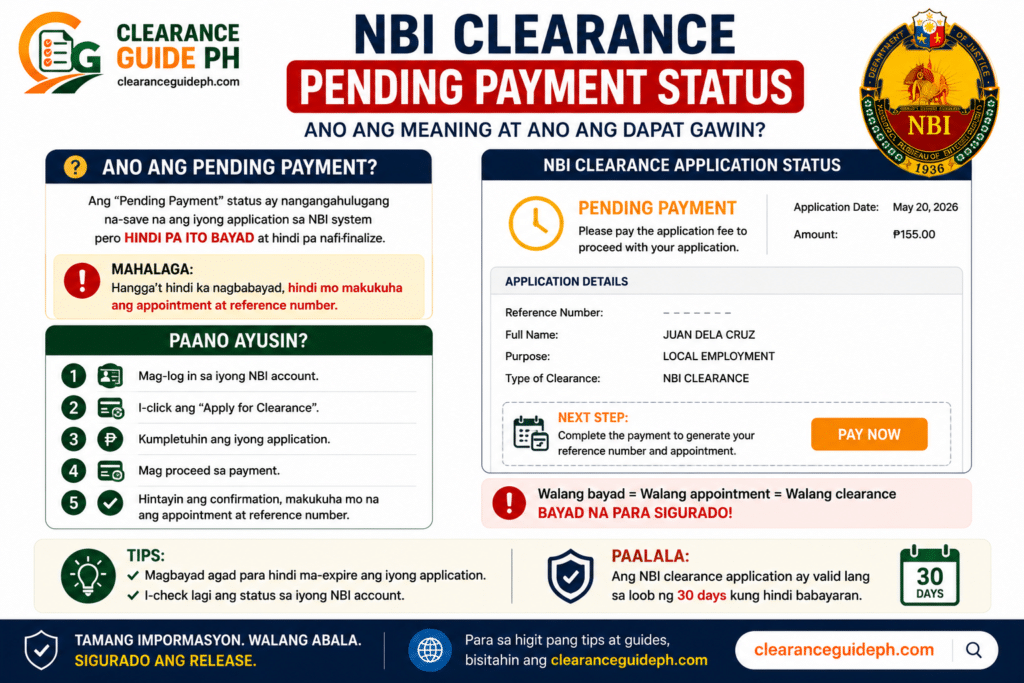
1. Delayed lang ang payment posting
Hindi lahat ng online payment ay instant sa receiving system. Minsan successful na sa payment app, pero hindi pa updated sa NBI portal.
Real tip:
Pagkatapos magbayad, huwag agad mag-refresh nang paulit-ulit every 5 seconds. Maghintay muna, then log out and log in ulit after some time.
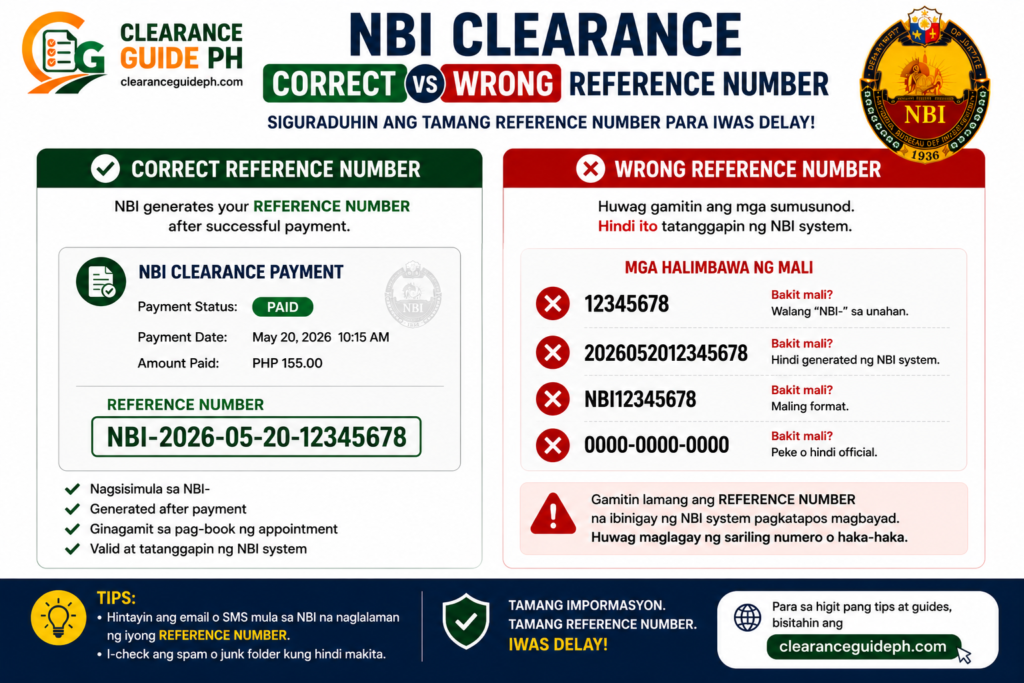
2. Mali ang reference number na nailagay
Ito ang pinaka-delikado. Kung wrong reference number ang ginamit mo, maaaring hindi ma-link ang payment sa NBI transaction mo.
The NBI’s official mailed clearance instructions say applicants should present their Reference Number to the selected payment channel, which shows how important the reference number is in matching payment to the clearance transaction.
Real tip:
Huwag i-type manually kung puwedeng copy-paste. Madaling mapagkamalan ang 0 at O, or 1 at I.
3. Wrong biller or wrong payment category
Kung GCash gamit mo, possible na maling biller ang napili mo. Halimbawa, akala mo NBI ang napili, pero ibang government biller pala.
GCash says if incorrect details were entered in bills payment, users should first check if the wallet was deducted; if deducted, they should contact the biller directly because requests and refunds depend on the biller.
4. Under maintenance ang biller
May times na available ang GCash app pero ang specific biller ay under maintenance. Kapag ganito, maaaring hindi mag-push through or magka-error ang payment.
GCash says grayed-out billers may be under maintenance and cannot be paid at that time.
5. Mahina ang internet habang nagbabayad
Minsan napuputol ang connection habang processing. Result: hindi sure kung failed, processing, or successful ba ang transaction.
Real tip:
Kung payment na ang ginagawa mo, huwag gumamit ng unstable data connection. Mas okay kung nasa strong signal ka or stable WiFi.
[H3] 6. Successful sa app, pero hindi pa confirmed sa NBI
6. Successful sa app, pero hindi pa confirmed sa NBI
Ito ang madalas mangyari. May receipt ka na, pero pending pa rin sa NBI account. Huwag muna mag-panic. Save your receipt and check again later.
GCash says users can check the GCash App Inbox or Transaction History to confirm whether a payment or transaction was successful.
Step-by-Step Fix: Ano ang Gagawin Kapag Hindi Nagre-reflect ang Payment?
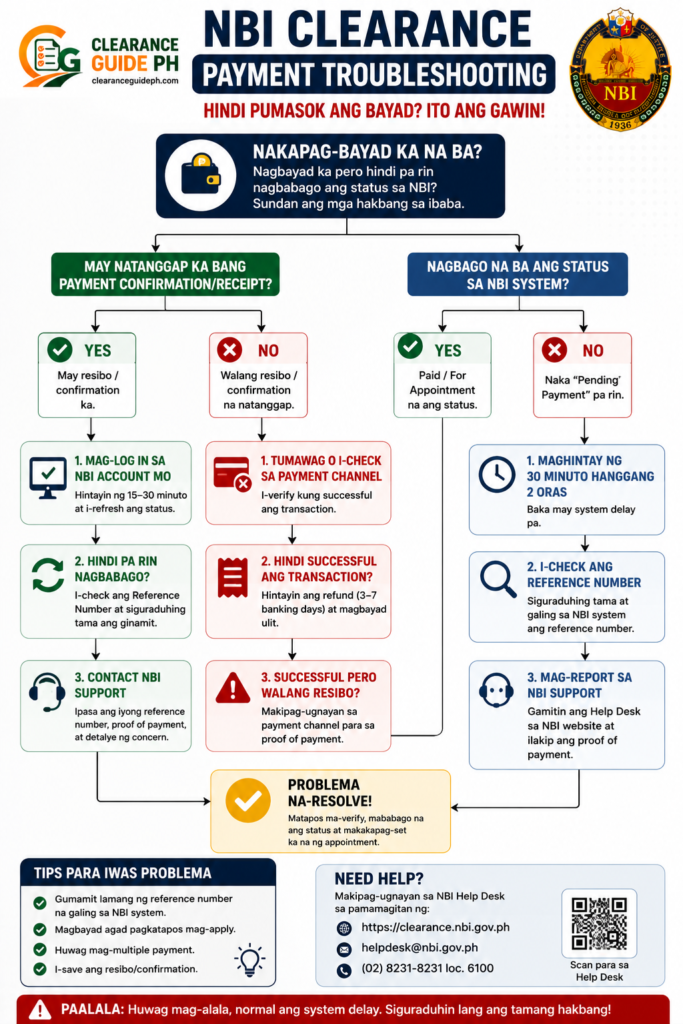
Step 1: Check kung nabawasan ang balance mo
Unang tanong: nabawasan ba ang wallet or bank account mo?
Kung hindi nabawasan, possible na hindi natuloy ang payment.
Kung nabawasan, huwag agad magbayad ulit.
GCash guidance says if there is no wallet deduction, the payment was not processed and the user may try paying again; if the wallet was deducted, the payment is being processed.
Step 2: Check your transaction history
Open your payment app and check transaction history.
Hanapin ang:
- Amount paid
- Biller name
- Reference number
- Date and time
- Transaction ID
- Status
- Receipt screenshot
Kung GCash gamit mo, check Transactions and Inbox.
Step 3: Compare the reference number
Bumalik sa NBI Clearance portal and compare your reference number.
Check carefully:
- Pareho ba ang reference number sa receipt and NBI account?
- Same ba ang amount?
- Same ba ang payment method?
- Same ba ang transaction date?
Real tip:
I-zoom mo ang screenshot. Huwag tingnan lang nang mabilis. Madalas ang issue ay isang maling digit lang.
Step 4: Log out and log in again
Sometimes, hindi updated ang session mo. Log out from your NBI account, close the browser, then log in again.
Check the Transactions section or payment status page.
Kung hindi ka sure kung saan nagsisimula ang NBI process, basahin muna ang how to apply for NBI Clearance online para makita ang full flow mula registration hanggang payment.
Step 5: Wait for posting
Kung deducted na ang payment at tama naman ang reference number, wait muna. Hindi lahat ng payment ay instant ang posting.
Real tip:
Huwag gumawa agad ng bagong transaction. Kapag nagbayad ka ulit, baka magkaroon ka ng duplicate payment at mas mahirap i-follow up.
Step 6: Save all proof
Before contacting support, ihanda ang complete proof.
Prepare:
- Full name
- NBI reference number
- Payment receipt screenshot
- Transaction ID
- Date and time of payment
- Amount paid
- Payment channel used
- Screenshot ng NBI pending status
Mas mabilis ka matutulungan kung complete ang screenshots mo.
Step 7: Contact the payment provider or biller support
Kung GCash ang ginamit mo and hindi pa rin posted, use the help option inside the app.
GCash’s help page says that if payment still has not reflected after checking the steps, users can go to Transactions, select the bills payment, and tap Get Help > “My payment hasn’t been posted.”
Special Case: NBI GCash Payment Not Reflecting
Kung GCash ang gamit mo, ito ang best flow:
- Open GCash
- Go to Transactions
- Find your NBI payment
- Screenshot the receipt
- Check if the biller is NBI
- Check reference number
- Check amount
- Check if payment was deducted
- Wait for posting
- Use GCash Help if not posted
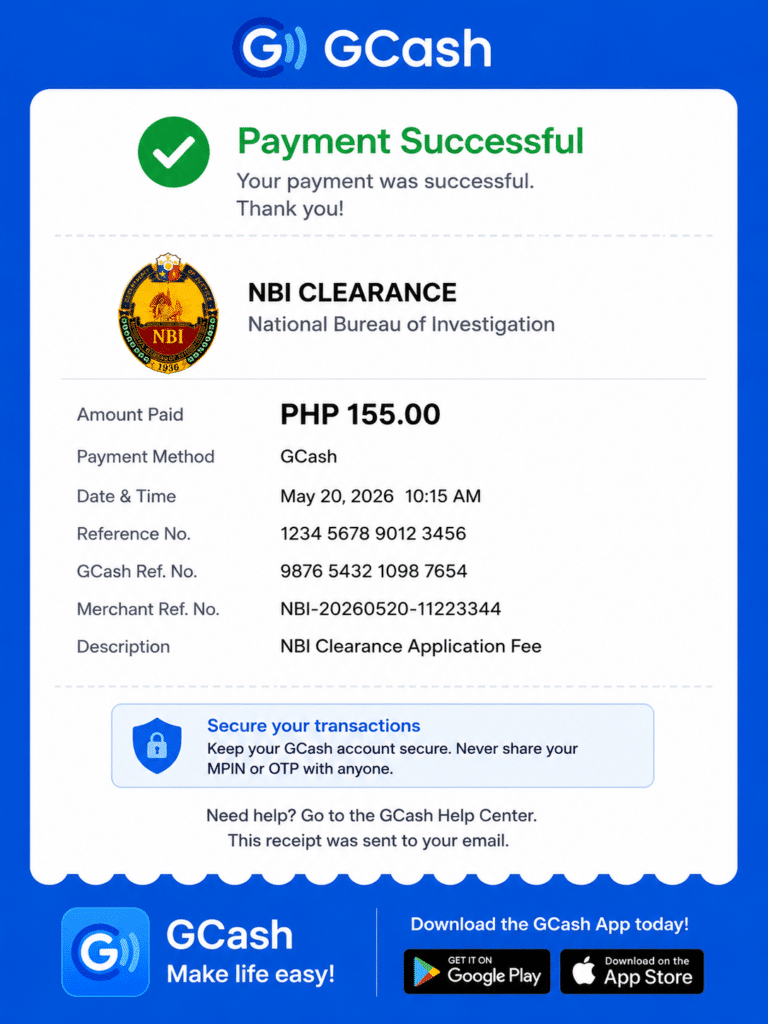
Kung GCash ang ginamit mo, sundan ang detailed guide namin sa NBI Clearance GCash payment para malaman kung paano i-check ang reference number, receipt, pending status, at possible payment errors.
Dapat Bang Magbayad Ulit Kapag Pending Pa Rin?
Usually, huwag muna.
Magbayad ulit only if:
- Hindi nabawasan ang wallet or bank mo
- Walang receipt
- Walang transaction history
- Confirmed failed ang payment
- Sinabi ng official payment provider na failed talaga
Kung nabawasan ka na at may receipt, treat it as processing or pending until verified.
Real tip:
Mas okay na ma-delay nang konti kaysa magkaroon ng double payment. Ang double payment mas hassle i-explain, lalo na kung magkaiba ang transaction numbers.
What If Mali ang Reference Number?
Kung mali ang reference number na nailagay mo, mas complicated ito. Hindi automatic na malilipat sa correct NBI transaction.
Do this:
- Screenshot your payment receipt
- Screenshot your correct NBI reference number
- Check if wallet was deducted
- Contact payment provider
- Contact the biller or proper support channel
- Do not create multiple payments agad
GCash states that when incorrect details are entered and the wallet was deducted, the user should contact the biller directly because requests and refunds depend on the biller.
What If Nabawas ang GCash Pero Walang Receipt?
Check these first:
- GCash transaction history
- GCash inbox
- SMS notification
- Email confirmation, if any
- App refresh
- Internet connection
- App update
If hindi lumalabas sa transaction history and walang deduction, GCash says the transaction did not go through.
Kung nabawasan pero wala kang makita, use GCash Help inside the app and report the issue with date, time, and amount.
What If Payment Channel Is Down?
Kung down or unavailable ang biller, huwag ipilit. Try again later or choose another payment option shown in the NBI portal.
Possible alternatives may include:
- GCash
- Maya
- 7-Eleven
- Bayad Center
- Online banking
- Other available channels shown in the portal
Kung nasa appointment/payment stage ka pa lang, check ang guide namin sa NBI appointment online para malaman kung paano pumili ng branch, schedule, at payment method bago magbayad.
Common Mistakes na Dapat Iwasan
1. Nagbayad ulit agad
Ito ang pinaka-common mistake. Kapag deducted na, huwag agad mag-second payment.
2. Hindi nag-screenshot
Always screenshot your reference number before payment and receipt after payment.
3. Wrong reference number
Double-check every digit. Mali ang isang character, possible na hindi mag-match.
4. Wrong biller
Make sure NBI ang selected biller kung NBI Clearance ang binabayaran mo.
5. Umasa sa memory
Huwag kabisado lang. Screenshot everything.
6. Hindi chineck ang Transactions page
Minsan paid na pala, pero hindi mo lang na-refresh or hindi mo tiningnan ang tamang section.
Real Tips Para Hindi Maulit ang Payment Problem
- Screenshot the reference number before opening payment app.
- Copy-paste reference number if possible.
- Check the biller name twice.
- Use stable internet.
- Do not close the app while processing.
- Screenshot the successful payment screen.
- Check transaction history right away.
- Do not pay twice kapag deducted na.
- Save screenshots in one phone folder.
- Bring payment proof on appointment day.
Bago pumunta sa branch, siguraduhin ding complete ang NBI Clearance requirements mo para hindi ka ma-delay kahit okay na ang payment.
What to Bring If Payment Was Delayed But Already Paid
Kung appointment day mo na and may proof ka na paid ka, bring these:
- Valid ID
- Extra valid ID
- NBI reference number
- Payment receipt screenshot
- Transaction ID
- Appointment screenshot
- Pending status screenshot
- Phone with payment app access
Real tip:
Magdala ng screenshot kahit may mobile data ka. May branches or areas na mahina signal.
For Renewal Applicants: What If Renewal Payment Is Pending?
Kung NBI renewal online ang ginagawa mo and hindi nagre-reflect ang payment, same rule: huwag agad magbayad ulit kung deducted na.
Check:
- Renewal reference number
- Payment receipt
- Delivery option
- Payment channel
- Transaction status
- Email or SMS confirmation
Kung renewal ang transaction mo, basahin ang guide namin sa nbi renewal online para malaman kung paano gumagana ang renewal, delivery option, payment, at possible delays.
Is Payment Pending Related to NBI HIT?
Usually, magkaiba sila.
Payment pending means hindi pa confirmed or reflected ang bayad mo.
NBI HIT means may possible record/name match during verification.
Pero pareho silang puwedeng mag-cause ng delay. Kaya dapat malinaw kung payment issue ba ang problema mo or verification issue.
Kung paid na ang status mo pero na-delay ka after biometrics dahil may record match, basahin ang guide namin tungkol sa NBI Clearance HIT meaning para malaman kung bakit nangyayari ang HIT at ano ang dapat gawin.
FAQs About NBI Payment Not Reflecting
Conclusion
Kapag hindi nagre-reflect ang NBI Clearance payment mo, huwag agad mag-panic at huwag agad magbayad ulit. Unang i-check kung nabawasan ang wallet, may receipt ba, tama ba ang reference number, at tama ba ang biller.
Kung deducted na ang payment, save your proof and wait for posting. Kung hindi pa rin nag-update, contact the payment provider or proper support channel with complete screenshots and transaction details.
Ang best protection mo ay simple lang: screenshot before payment, screenshot after payment, check reference number twice, and never pay twice without verification.
Related Guides:
