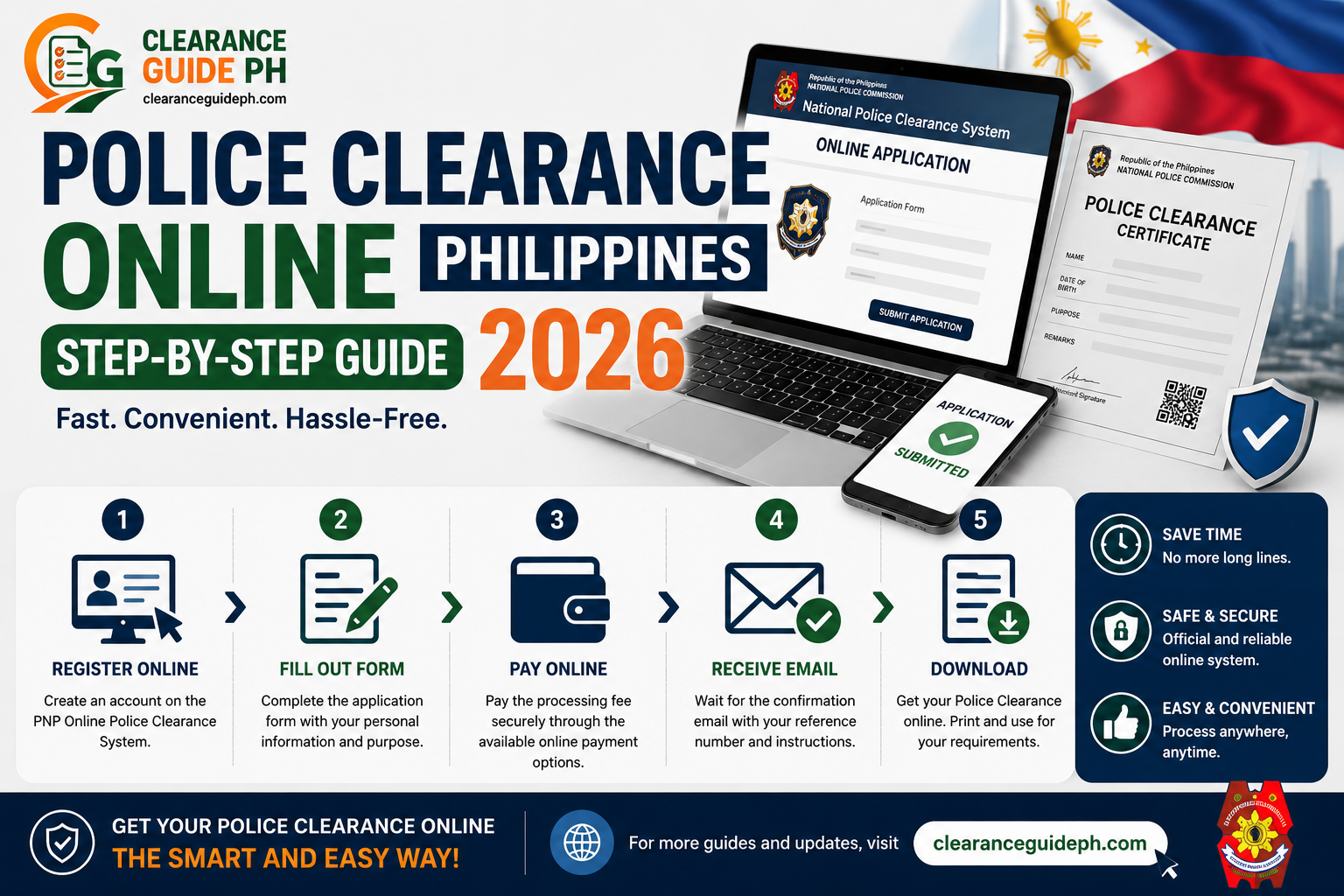
Police Clearance Online Philippines 2026: Step-by-Step Guide
Paano Mag Apply ng Police Clearance Online Philippines 2026: Simple Step-by-Step Guide
Kung kailangan mo ng Police Clearance para sa trabaho, local employment, government transaction, business requirement, or ID requirement, puwede ka nang magsimula online through the National Police Clearance System or NPCS.
Hindi na tulad dati na diretso ka lang pupunta sa police station at pipila. Ngayon, mas organized na ang process dahil kailangan mong gumawa ng online account, mag-fill out ng profile, pumili ng police station, kumuha ng appointment schedule, magbayad online, at pumunta sa selected station for biometrics, photo, fingerprint, and verification.
Ang official National Police Clearance System is described as a system for the issuance of Police Clearance nationwide, and its official application guide lists the flow as online registration, profile completion and appointment setting, online payment, then processing at the police station.
Disclaimer: ClearanceGuidePH.com is an independent guide website. Hindi ito official website ng Philippine National Police. Always verify final requirements, fees, schedules, and station rules through the official NPCS portal and your selected police station.
Quick Answer: Paano Mag Apply ng Police Clearance Online?
Para mag-apply ng Police Clearance Online Philippines, pumunta sa official National Police Clearance System, gumawa ng account, kumpletuhin ang profile, pumili ng police station, mag-set ng appointment, magbayad online, then pumunta sa selected police station on your appointment date for biometrics, photo capture, fingerprint scanning, verification, and clearance release.
Simple process:
- Gumawa ng NPCS account
- I-verify ang email
- Complete your personal profile
- Piliin ang clearance application
- Pumili ng police station
- Pumili ng appointment date and time
- Magbayad through available payment channel
- I-save ang reference number and receipt
- Pumunta sa police station
- Magpa-biometrics, photo, and verification
- Kunin ang Police Clearance kung cleared
Ano ang National Police Clearance?
Ang National Police Clearance ay clearance document issued through the Philippine National Police system. Ginagamit ito para makita kung ang applicant ay may police record or derogatory record based on the system used by PNP.
Common itong hinihingi sa:
- Local job application
- Company employment requirements
- Government transaction
- Business permit support
- Financial or bank-related requirements
- Local ID or documentation purposes
- Other domestic transactions
Hindi ito laging kapalit ng NBI Clearance. May employers or agencies na Police Clearance ang hinihingi, habang may iba naman na NBI Clearance ang required. Mas safe na tanungin muna ang HR, school, agency, or office kung alin ang kailangan nila.
Kung kailangan din ng employer mo ang NBI Clearance, basahin ang guide namin sa how to apply for NBI Clearance online para malaman ang full online process.
Police Clearance Online Requirements 2026
Bago ka mag-start ng online application, ihanda muna ang basic requirements.
Basic Requirements
- Active email address
- Active mobile number
- NPCS online account
- Completed online profile
- Appointment schedule
- Reference number
- Proof of payment
- Valid IDs
- Personal appearance for biometrics
Public guides and police-station advisories commonly remind applicants to bring valid IDs, reference number, and official receipt on the appointment day.
Valid IDs for Police Clearance
Para maiwasan ang rejection, magdala ng original and valid IDs. Mas safe kung may two valid IDs ka, especially kung hindi ka sure sa policy ng selected station.
Common IDs na ginagamit for Police Clearance include:
- Passport
- Driver’s License
- UMID
- SSS ID
- GSIS ID
- PRC ID
- PhilHealth ID
- Postal ID
- National ID / PhilID
- Voter’s ID
- Senior Citizen ID
- PWD ID
- TIN ID
- School ID with registration form
Several public NPCS ID guides list common acceptable IDs such as Passport, Driver’s License, PRC ID, PhilHealth ID, Postal ID, SSS/UMID, Senior Citizen ID, TIN ID, Voter’s ID, School ID with registration form, and PhilID.
Tip: Huwag umasa sa photocopy or screenshot lang ng ID. Dalhin ang original ID.
Step-by-Step Guide: Paano Mag Apply ng Police Clearance Online Philippines
Step 1: Pumunta sa Official National Police Clearance System
Unang step ay pumunta sa official National Police Clearance System. Dito ka gagawa ng account, magse-set ng appointment, and magpa-process ng application.
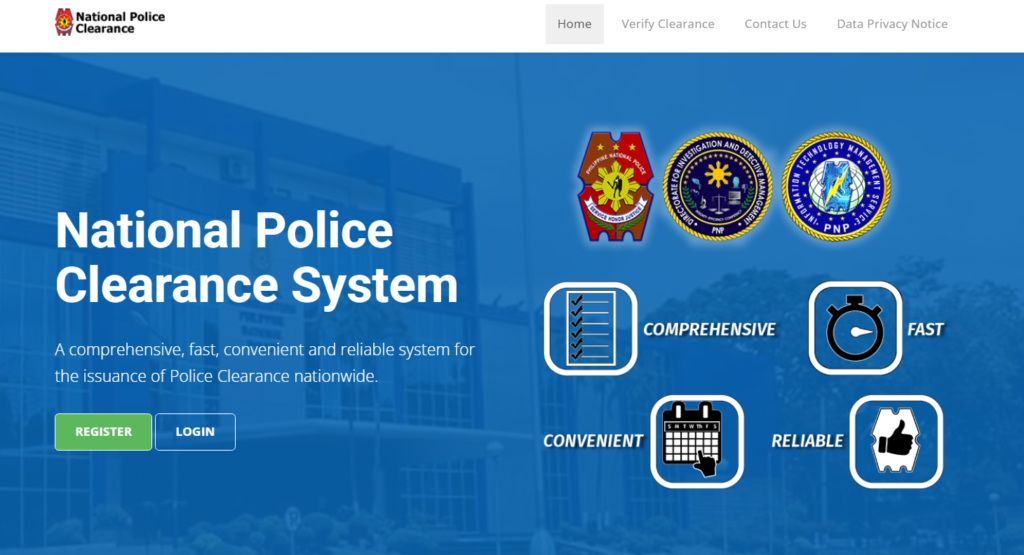
Iwasan ang random links sa Facebook comments, unofficial websites, or pages na humihingi ng extra payment. Gumamit lang ng official portal and authorized payment channels.
Step 2: Gumawa ng NPCS Account
Kapag nasa portal ka na, mag-register gamit ang active email address. Siguraduhin na kaya mong buksan ang email mo dahil maaaring kailanganin ito for verification, password recovery, or account confirmation.
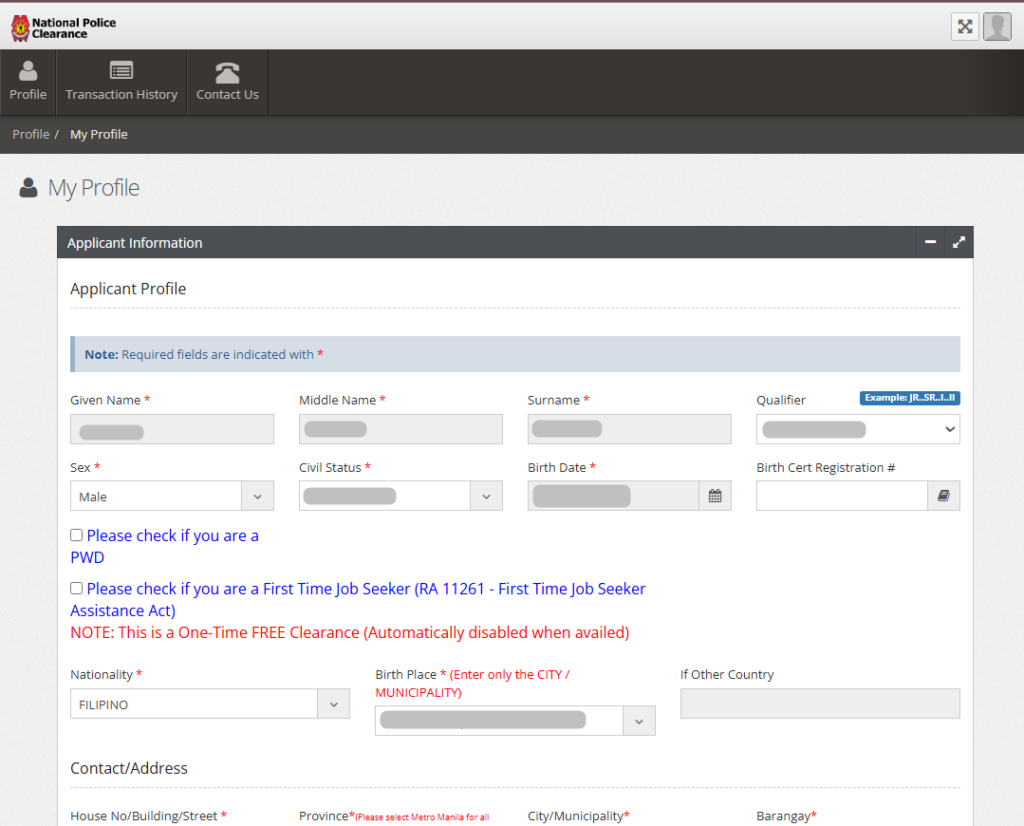
Ilagay ang correct details:
- Full name
- Email address
- Mobile number
- Password
- Other required account information
Tip: Gumamit ng email na personal mo at hindi mawawala sa iyo. Huwag gumamit ng email ng ibang tao.
Step 3: I-Verify ang Email Address
After registration, i-check ang email inbox mo. May possibility na may verification link or confirmation email.
Kung wala sa inbox, check:
- Spam folder
- Promotions tab
- Updates tab
- Junk folder
Huwag gumawa agad ng panibagong account kung hindi mo pa na-check ang email folders mo.
Step 4: Complete Your Profile
Pag naka-login ka na, kumpletuhin ang profile mo. Dito mahalaga ang accuracy.
Double-check:
- First name
- Middle name
- Last name
- Birthdate
- Birthplace
- Gender
- Civil status
- Address
- Contact number
- ID details
Kung mali ang spelling ng pangalan or birthday mo, puwedeng magkaroon ng verification issue sa police station.
Step 5: Start Clearance Application
Pag complete na ang profile mo, hanapin ang clearance application option. Piliin ang appropriate clearance type shown in the system.
The official application guide for NPCS summarizes the process as registration, profile completion and appointment setting, online payment, and processing at the police station.
Step 6: Pumili ng Police Station
Next, pipili ka ng police station kung saan mo gustong magpa-process.
Piliin ang station based on:
- Lapit sa bahay
- Lapit sa work
- Available appointment slot
- Easy commute or parking
- Office hours
- Accessibility
- Reviews or user feedback, if available
Important: Huwag pumili ng station na hindi mo kayang puntahan sa appointment date. Kahit online ang registration, kailangan mo pa ring pumunta for biometrics.
Step 7: Pumili ng Appointment Date and Time
After choosing the station, pumili ng appointment schedule. Piliin ang date and time na sure kang available.
Tips para mas smooth:
- Pumili ng weekday kung possible
- Morning slot is usually better kung gusto mong matapos nang maaga
- Avoid last-minute booking
- Maglaan ng extra time for commute and waiting
- Check kung holiday or special non-working day
Step 8: Magbayad Through Available Payment Channel
After appointment, proceed sa payment. Sundin ang actual payment instructions na lalabas sa system.
Some public guides describe NPCS payment as going through the Land Bank ePayment Portal, with options that may include Land Bank account, GCash, BancNet, and 7-Eleven/CLiQQ depending on availability.
Important: Payment options and fees can change. Always follow the amount and payment channel shown in your actual NPCS transaction page.
Step 9: I-Save ang Reference Number and Receipt
Pagkatapos magbayad, i-save agad ang:
- Reference number
- Appointment schedule
- Payment receipt
- Transaction confirmation
- Police station name
- Date and time
Screenshot everything. Kung may payment issue or verification delay, ito ang magiging proof mo.
Step 10: Pumunta sa Police Station on Appointment Day
Sa appointment day, pumunta sa selected police station. Bring your valid IDs, receipt, and reference number.
Usually, gagawin sa station ang:
- Appointment verification
- ID checking
- Photo capture
- Fingerprint biometrics
- Signature capture
- Record checking
- Clearance printing or release
Public police-clearance guides commonly describe the in-person visit as the biometrics and verification stage after online registration, appointment, and payment.
What to Bring on Appointment Day
Dalhin ang mga ito:
- Two valid IDs, if available
- Appointment reference number
- Official receipt or payment proof
- Printed application form, if available
- Phone with screenshots
- Ballpen
- First-time job seeker barangay certification, if applicable
Tip: Ilagay lahat sa isang envelope para hindi ka mahirapan maghanap sa station.
Police Clearance for First-Time Job Seekers
Kung first-time job seeker ka, possible kang ma-cover ng Republic Act No. 11261, also known as the First Time Jobseekers Assistance Act. This law waives government fees and charges for documents required in employment applications, subject to conditions.
The implementing rules state that a person availing of the benefit must secure and present a barangay certification stating that they are a first-time jobseeker and a resident of the issuing barangay for at least six months.
Prepare:
- Barangay Certification
- Valid ID
- NPCS account
- Appointment details
- Other documents required by the selected police station
Important: Confirm with your selected station before appointment, because actual implementation may vary.
Para sa iba pang government documents, basahin ang complete guide namin sa clearance requirements in the Philippines.
Common Problems and Solutions
Problem 1: Hindi Dumating ang Email Verification
Solution: Check spam, junk, promotions, or updates folder. Make sure correct ang email na ginamit mo.
Problem 2: Fully Booked ang Nearby Police Station
Solution: Check nearby stations. Huwag mag-focus sa isang location lang. Use Google Maps para makita ang nearby police stations and travel distance.
Para mas madaling mahanap ang pinakamalapit na police station, open Google Maps and search: “police clearance near me” or “PNP police station near me.” Piliin ang station na malapit sa iyo, then i-check kung available ito sa NPCS appointment system.
Reminder: Map links are for navigation purposes only. Always confirm your official appointment through the National Police Clearance System before going to any police station.
Problem 3: Pending ang Payment
Solution: Huwag agad magbayad ulit. I-save ang receipt, check transaction status, and wait for posting. Kung matagal pa rin, contact the payment provider or station support.
Problem 4: Mali ang Personal Details
Solution: Ayusin muna ang profile bago mag-finalize ng application. Kung locked na or hindi editable, ask assistance from NPCS or selected police station.
Problem 5: May HIT or Record Match
Solution: Huwag mag-panic. Like NBI, possible na may namesake or record match. Follow the instruction of the police station and bring additional documents if required.
Kung may record match or namesake issue ka, basahin din ang guide tungkol sa NBI Clearance HIT meaning para maintindihan kung paano gumagana ang verification.
FAQs About Police Clearance Online Philippines
Conclusion
Ang pag-apply ng Police Clearance Online Philippines ay mas madali kung prepared ka bago magsimula. Kailangan mo lang gumawa ng NPCS account, kumpletuhin ang profile, pumili ng police station, mag-set ng appointment, magbayad, at pumunta sa station for biometrics and verification.
Para hindi ma-delay, siguraduhin na tama ang personal details mo, valid ang IDs mo, saved ang reference number and receipt, at confirmed ang appointment mo. For better user experience, gamitin din ang Google Maps para ma-check ang exact station location, travel time, and nearby alternatives.
Related Guides:

2 Comments